Best Sitting Posture at the Computer | Complete Ergonomics Guide for Spine Health
Meta Description:
Learn how to maintain the right sitting posture when using a computer. Proper ergonomics prevent back pain, neck stiffness, and eye fatigue. Discover the best monitor height, chair setup, and stretching techniques.
🩺 Introduction
Spending long hours on the computer is part of modern life, but poor posture can cause serious health issues — from lower back pain and tight shoulders to chronic fatigue.
Maintaining an ergonomic sitting position protects your spine and boosts productivity.
💺 Ergonomic Sitting Guidelines
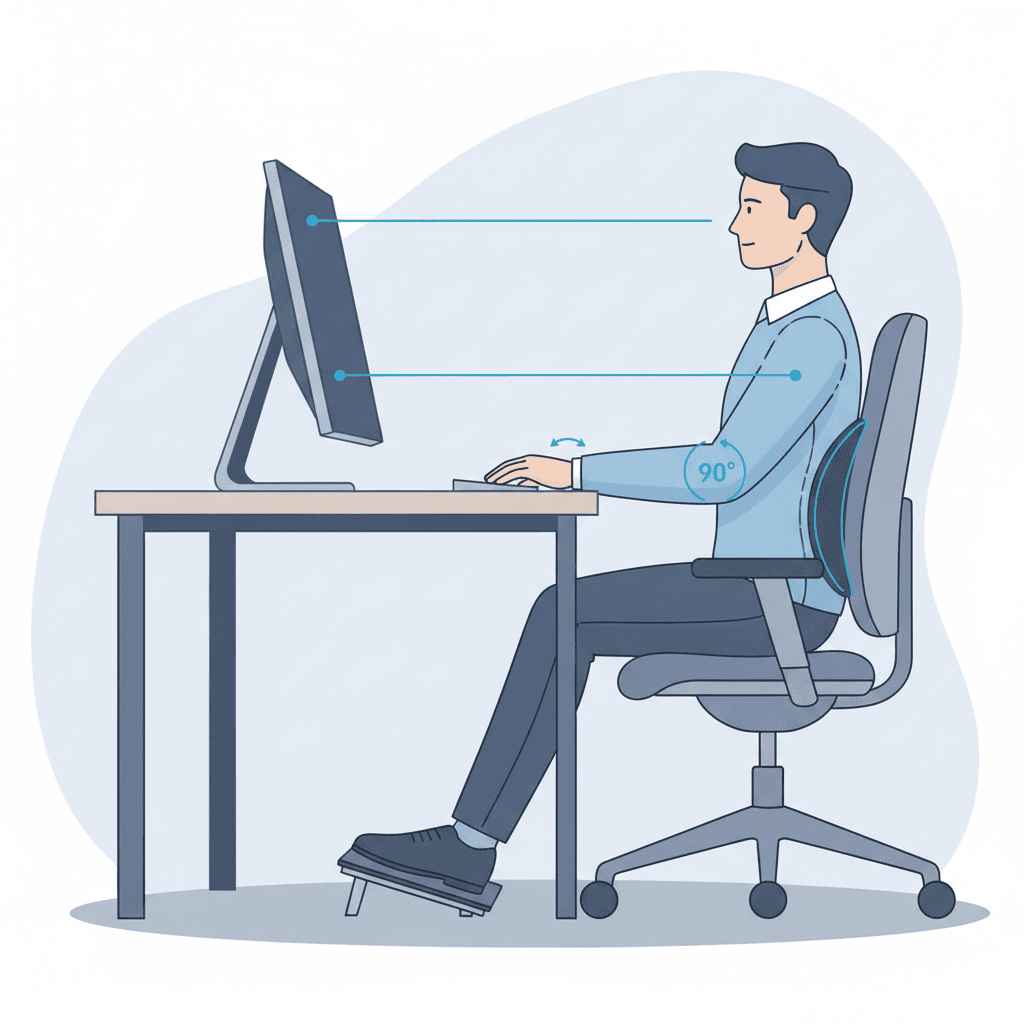
1. Chair Height
Keep your feet flat on the floor.
Knees bent at a 90° angle.
If your feet don’t reach the ground, use a footrest.
2. Back Support
Keep your spine’s natural S-curve.
Use lumbar support to reduce lower back tension.
3. Monitor Placement
The top of the screen should be at or slightly below eye level.
The monitor should be about 50–70 cm (arm’s length) away.
4. Keyboard & Mouse
Align your keyboard with your body.
Keep wrists straight and supported to prevent carpal tunnel syndrome.
5. Take Regular Breaks
Every 30–45 minutes, stand up, stretch, and look away from the screen to relax your eyes and muscles.
👁 Rule 20‑20‑20
Every 20 minutes, look at an object 20 feet away for 20 seconds to reduce eye strain.